
Understanding how visitors interact with your website is essential for making informed business decisions, improving user experience, and growing your online presence. Whether you run a personal blog, an e-commerce store, or a business website, knowing where your visitors come from, what pages they view, and how they engage with your content can help you optimize your website for better performance. This is where Google Analytics plays a crucial role.
Google Analytics is one of the world’s most popular web analytics platforms, helping millions of website owners collect and analyze visitor data. Instead of simply counting page views, Google Analytics provides detailed insights into user behavior, traffic sources, conversions, and engagement. These insights enable businesses to measure marketing success, improve SEO strategies, and understand customer journeys.
The latest version, Google Analytics 4 (GA4), uses an event-based measurement model that tracks user interactions across websites and mobile apps. Combined with Artificial Intelligence (AI) and machine learning, GA4 provides deeper insights while adapting to changing privacy standards.
This article explains how Google Analytics tracks website visitors, what data it collects, the technologies behind it, and how businesses can use these insights to improve website performance and digital marketing strategies.
What Is Google Analytics?
Google Analytics is a free web analytics platform developed by Google that collects, processes, and reports data about website visitors.
It helps website owners understand-
- How many people visit the website
- Where visitors come from
- Which pages they view
- How long they stay
- What actions they take
- Which marketing channels perform best
- How effectively the website achieves business goals
Rather than guessing how users interact with a website, Google Analytics provides measurable data for informed decision-making.
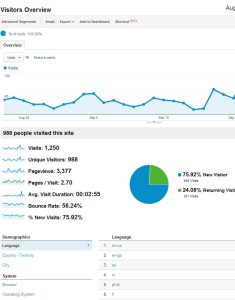
How Google Analytics Works
Google Analytics works by collecting data whenever someone visits a website that has the Google Analytics tracking code installed.
The process generally involves four steps-
- Data collection
- Data processing
- Data organization
- Report generation
This process happens automatically every time a visitor interacts with the website.
Step 1: Installing the Tracking Code
Before Google Analytics can collect information, a website owner must install the Google Analytics tracking code on every page of the website.
The tracking code is a small JavaScript snippet that loads when a visitor opens a webpage.
Its job is to-
- Detect page visits
- Record user interactions
- Send data securely to Google Analytics
- Identify events such as clicks and scrolling
Without this tracking code, Google Analytics cannot measure website activity.
Step 2: Collecting Visitor Data
When someone visits the website, the tracking code automatically collects information about the session.
Examples include-
- Pages visited
- Time spent on pages
- Device type
- Browser
- Operating system
- Screen resolution
- Geographic region (based on IP-derived location)
- Traffic source
- Language settings
The tracking code sends this information to Google Analytics for processing.
Step 3: Tracking User Events
Google Analytics 4 uses an event-based measurement model.
Instead of focusing mainly on page views, GA4 records specific user interactions called events.
Examples include-
- Page views
- Button clicks
- Video plays
- File downloads
- Scroll depth
- Form submissions
- Purchases
- Newsletter sign-ups
Each event helps businesses better understand how visitors engage with their website.
Cookies and User Identification
Traditionally, Google Analytics has used browser cookies to help recognize returning visitors.
Cookies can store information such as-
- Anonymous visitor identifiers
- Session details
- Previous visits
- User preferences
In Google Analytics 4, measurement is more flexible and can also use modeled data and consent-aware approaches to adapt to modern privacy requirements.
It’s important to note that Google Analytics is designed to avoid collecting personally identifiable information (PII), such as names or email addresses, unless a site is improperly configured.
Understanding Sessions
A session represents a period during which a visitor interacts with your website.
During a session, Google Analytics can record-
- Multiple page views
- Clicks
- Scrolls
- Purchases
- Downloads
- Other interactions
Session data helps website owners understand how users navigate their websites.
Traffic Sources
Google Analytics identifies how visitors arrived at a website.
Common traffic sources include-
Organic Search
Visitors arriving through search engines like Google.
Direct Traffic
Users who type the website address directly or use bookmarks.
Referral Traffic
Visitors coming from links on other websites.
Social Media
Traffic generated through social networking platforms.
Email Marketing
Visitors who click links in email campaigns.
Paid Advertising
Traffic generated through paid search or display advertising.
Understanding traffic sources helps businesses evaluate marketing performance.
Measuring User Engagement
Google Analytics tracks how visitors interact with website content.
Important engagement metrics include-
- Engaged sessions
- Average engagement time
- Pages viewed
- Scroll activity
- Event count
- Returning users
These metrics help determine whether visitors find the website useful and engaging.
Conversion Tracking
One of the most valuable features of Google Analytics is conversion tracking.
Conversions may include-
- Product purchases
- Contact form submissions
- Account registrations
- Newsletter subscriptions
- Phone call clicks
- Appointment bookings
Businesses can measure how effectively their website supports business objectives.
Audience Information
Google Analytics provides anonymous audience insights such as-
- Country
- City
- Device category
- Browser
- Operating system
- Language
These insights help businesses tailor content and marketing strategies to their audience.
AI and Machine Learning in Google Analytics
Google Analytics 4 uses Artificial Intelligence to generate valuable insights automatically.
Examples include-
- Predictive purchase behavior
- Revenue forecasting
- Audience predictions
- Automatic anomaly detection
- Trend analysis
AI helps businesses identify opportunities and respond to changes more quickly.
Privacy and Data Protection
Privacy has become increasingly important in digital analytics.
Google Analytics supports privacy by-
- Offering consent-aware measurement
- Providing data retention controls
- Allowing IP anonymization in supported configurations
- Giving website owners options to manage data collection in line with applicable privacy laws
Businesses should also maintain clear privacy policies and obtain user consent where required by law.
Benefits of Tracking Website Visitors
Tracking visitor behavior provides numerous advantages.
Improve User Experience
Understanding navigation patterns helps improve website design and usability.
Better SEO
Analytics identifies high-performing content and pages that need optimization.
Smarter Marketing
Businesses can invest more confidently in the channels that deliver the best results.
Higher Conversion Rates
Tracking conversions reveals opportunities to improve forms, landing pages, and calls to action.
Data-Driven Decisions
Analytics replaces assumptions with measurable insights that support better business strategies.
Best Practices for Using Google Analytics
To get the most value from Google Analytics-
- Install the tracking code correctly on all pages.
- Configure key events and conversions.
- Review reports regularly.
- Connect Google Search Console.
- Analyze traffic sources.
- Optimize high-performing pages.
- Improve low-engagement content.
- Respect user privacy and obtain consent where required.
- Use data to guide continuous website improvements.
These practices help businesses make informed, data-driven decisions.
Google Analytics is a powerful platform that helps website owners understand how visitors interact with their websites. By collecting anonymous data through tracking code, recording events, analyzing user behavior, and generating detailed reports, it provides valuable insights into website traffic, engagement, marketing performance, and conversions.
Modern Google Analytics 4 goes beyond traditional page view tracking by using an event-based model, AI-powered insights, and privacy-conscious measurement techniques. This enables businesses to understand the complete customer journey across devices and platforms while adapting to evolving privacy expectations.
Whether you manage a blog, an online store, or a business website, understanding how Google Analytics tracks visitors empowers you to improve user experience, optimize marketing campaigns, strengthen SEO performance, and achieve your business goals. By implementing Google Analytics correctly and regularly analyzing its reports, organizations can make smarter decisions, enhance website performance, and build a stronger digital presence in an increasingly competitive online landscape.